R-03 Foundry & Azure
SocialHub with Azure
I built my own social hub. One single page where everything comes together: LinkedIn, Instagram, the blog, the podcast, the newsletter, my speaking dates. One link I hand out, and behind it sits the whole Röstmeister universe instead of three separate URLs where I forget the fourth one anyway while typing.
In case the term doesn’t ring a bell: these „one page for all your channels“ things often go by names like Linktree. Ready-made bio link tools, SaaS, generic, your data sits with a third party, and anything beyond the basics costs money. I wanted the same result, but built myself and kept in my own hands.
So I thought: I can build this myself. On Azure. And because I want to extend it later without clicking through the portal every single time, with Infrastructure as Code. A colleague I showed the result to just said: that’s actually pretty cool. That was the push to finish it properly and make it public.
Small reality check first, and anyone who knows me knows this: I am not a developer. I am a consultant. I asked an AI for advice on Bicep and on the Express server every now and then, the way you ask a colleague who knows that corner better. But that is exactly the point. You don’t have to be a developer to set up a proof of concept and see what comes out of it. What came out is a page that has been running in production for three months. Cost so far: zero euros.
The complete, working code is available as a public blueprint repo, properly sanitized, MIT licensed: github.com/DerM365Roestmeister/m365-social-hub-blueprint. Fork it, put your own links in, deploy. In this article we go from the idea through the architecture to the real Bicep code and the deployment.
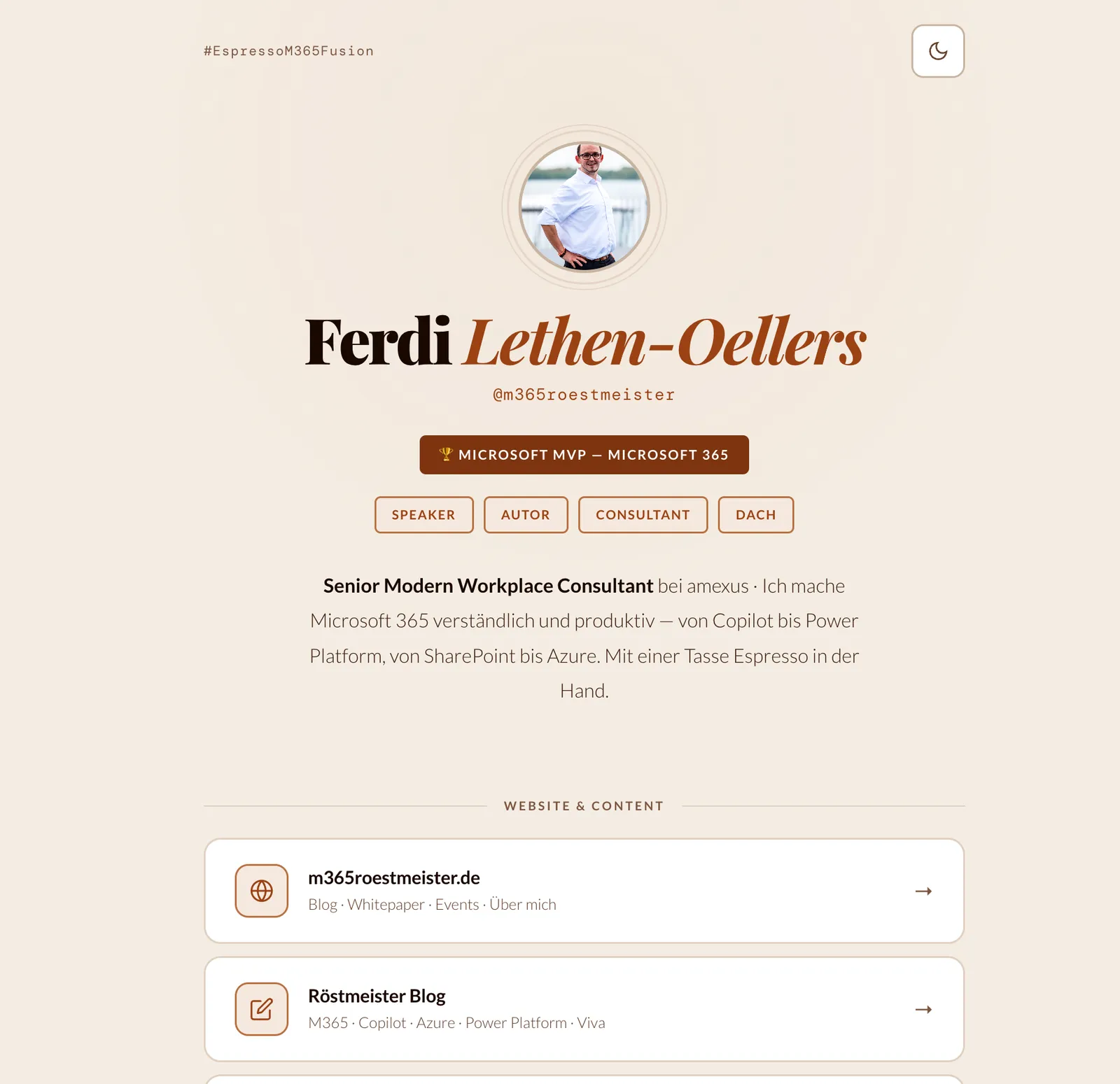
This is what it looks like: one link, everything behind it. Running on Azure App Service F1 for three months now, at 0 €.
The idea: deliberately simple
My requirements were manageable. One page. All links, publications and events on it. Fast, no tracking, no third party in between. Full control over design and data.
What I explicitly did not want: a database, a CMS, a build process with half a frontend framework. For a page with a few link cards that is using a sledgehammer to crack a nut. So: a static index.html, served by a tiny Node/Express server. Nothing more. The avatar is pure CSS, initials in a circle, so I don’t even have to host an image somewhere.
The decision against a ready-made bio link tool was quick. I didn’t want somebody else’s branding, I didn’t want my data at a third party, and I didn’t want a paywall for two extra buttons. The price for that is some work of your own. The gain is that the thing belongs to me completely.
Why Azure App Service
For M365 admins Azure is not an alien planet. Same tenant, same billing, same tile in the portal. If you are in Entra ID and Conditional Access every day anyway, then „quickly host a small web app“ is not a context switch, it’s the room next door.
App Service is exactly right for a small Node app like this. You don’t have to patch a server, HTTPS is built in, and if it ever needs to grow you scale up instead of rebuilding. But the real hook for everyone who wants to host „just something small“ is the price: I run the page on the F1 tier, the free tier. Three months live, zero euro invoice.
Azure Static Web Apps would have been a candidate too for a purely static page. I still went with App Service plus a small Express server, because I wanted two things in my own hands: my own security headers (Content Security Policy, HSTS and friends) and a /health endpoint for health checks. That is a matter of taste, but it was a deliberate decision, not an accident.
Why Bicep instead of clicking or raw CLI
The project started unspectacularly: with imperative az commands. Create resource group, create plan, create web app. Step by step, nicely in order.
That works. The first time. The problem shows up the second time. If you want to set the page up again in another region, or show a colleague how it’s done, you copy commands together from an old note and hope you didn’t forget anything. No versioning, no way to trace which resource was created when and why.
Bicep solves exactly that. You describe the target state declaratively, you put the file into Git, and a single command builds the complete infrastructure. For M365 admins this is mentally the same pattern as a configuration baseline or PowerShell DSC: you don’t say „do step 1, then 2, then 3“, you say „this is how it should look in the end“.
And yes, Bicep compiles down to ARM JSON in the end. But you read and write a clean configuration file instead of a JSON wall full of angle brackets. No ARM war. That was the moment where I noticed as a non-developer: I can read this. I can adapt this.
The architecture
The whole thing is deliberately kept small. One resource group, inside it an App Service Plan on F1, on top of it a web app with Node 20 LTS that serves the static index.html via Express. No database, no CDN, no custom domain in the default case.
rg-<appName>.npm install runs automatically on the platform during deploy.index.html, done.The complete code for this is open in the blueprint repo: github.com/DerM365Roestmeister/m365-social-hub-blueprint.
The Bicep code in detail
Now to the core. All snippets are 1:1 from the public repo, nothing staged.
Everything in one deploy: subscription scope
The trick that saves me the manual az group create sits right in line one of infra/main.bicep. The template works at subscription level and creates the resource group itself:
targetScope = 'subscription'

@description('Name of the Web App. Must be globally unique across Azure.')
param appName string

@description('Azure region for all resources.')
param location string = 'westeurope'

@description('App Service Plan SKU. F1 is the free tier.')
param sku string = 'F1'

resource rg 'Microsoft.Resources/resourceGroups@2024-03-01' = {
  name: resourceGroupName
  location: location
}

module appService 'modules/appservice.bicep' = {
  name: 'appServiceDeployment'
  scope: rg
  params: {
    appName: appName
    location: location
    sku: sku
    nodeVersion: nodeVersion
    enableCustomDomain: enableCustomDomain
    customDomainName: customDomainName
  }
}
The punchline: a single az deployment sub create creates resource group, plan and web app in one go. No warm-up, no „first the group, then the rest“.
The App Service module
The actual resources live in a separate module, infra/modules/appservice.bicep. That is the module pattern in Bicep: the subscription template takes care of the resource group, the module runs in the scope of that group and builds plan and app. Cleaner than squeezing everything into one file.
resource appServicePlan 'Microsoft.Web/serverfarms@2023-12-01' = {
  name: appServicePlanName
  location: location
  kind: 'linux'
  properties: {
    reserved: true
  }
  sku: {
    name: sku
  }
}

resource webApp 'Microsoft.Web/sites@2023-12-01' = {
  name: appName
  location: location
  properties: {
    serverFarmId: appServicePlan.id
    siteConfig: {
      linuxFxVersion: 'NODE|${nodeVersion}'
      appSettings: [
        {
          name: 'SCM_DO_BUILD_DURING_DEPLOYMENT'
          value: 'true'
        }
      ]
    }
    httpsOnly: true
  }
}
Two things matter here. linuxFxVersion tells App Service which runtime to run. And SCM_DO_BUILD_DURING_DEPLOYMENT set to true makes Azure run npm install itself during the deploy. You upload your code, the platform does the rest. httpsOnly enforces HTTPS without you having to take care of it.
Parameters instead of hardcoding
This one was the real aha moment for me, the reason the whole blueprint can be shared at all. In infra/main.bicepparam there are no real names, only placeholders:
using 'main.bicep'

param appName = 'change-me-app-name'
param location = 'westeurope'
param sku = 'F1'
param nodeVersion = '20-lts'
param enableCustomDomain = false
param customDomainName = ''
That is how you make infrastructure code reusable. No tenant reference in the template, only values that everybody fills in themselves. Exactly why I can make the repo public and you can fork it 1:1 without any of my data sticking to it.
Custom domain, but only if you want it
The template grows with you, without leaving you stuck on F1. Custom domain and managed certificate are only created if you flip the switch. In Bicep those are conditional resources with if:
resource hostNameBinding 'Microsoft.Web/sites/hostNameBindings@2023-12-01' = if (enableCustomDomain) {
  parent: webApp
  name: customDomainName
  properties: {
    siteName: appName
    hostNameType: 'Verified'
  }
}Custom domains are not available on the F1 free tier. You need at least B1 for that. It says so as a comment in the code too. One parameter, one redeploy, done. But then it costs.
Deployment in practice
This is the flow I actually use.
az deployment sub what-if \
  --location westeurope \
  --template-file infra/main.bicep \
  --parameters infra/main.bicepparam
If that looks good, the real deploy follows:
az deployment sub create \
  --location westeurope \
  --template-file infra/main.bicep \
  --parameters infra/main.bicepparam
And after that the code:
zip -r deploy.zip . -x "node_modules/*" -x ".git/*" -x "*.zip"
az webapp deploy \
  --name <appName> \
  --resource-group rg-<appName> \
  --src-path deploy.zip \
  --type zip
The classic stumbling block with Node on App Service is the startup behaviour, by the way. If the app doesn’t come up, it is almost always because the startup command or the PORT is wrong. That’s why the Express server reads the port from process.env.PORT, which App Service sets itself, and falls back to 3000 locally. Exactly the kind of detail where I got a second opinion from the AI instead of digging through logs for an hour.
The cost reality, without sugarcoating
Again, clearly: three months live, F1 tier, 0 € invoice. That is not marketing, that is my billing statement.
| Tier | What you get | Who it fits |
|---|---|---|
| F1 · default in the blueprint 0 € per month | No custom domain, a daily quota of 60 CPU minutes (then 403 until the reset), no „always on“, so an occasional cold start | A personal bio page with moderate traffic. The wrong place for a production customer app. |
| B1 · upgrade path around 13 € per month | Custom domain possible, dedicated compute, no daily quota | Anyone who wants their own domain or needs reliable availability. |
The switch is trivial thanks to Bicep: sku from F1 to B1, enableCustomDomain to true, redeploy. Prices change, so always double-check the current Azure pricing page.
From my own project to a public blueprint
Why a separate, sanitized repo instead of just showing my live code? Because my production version contains real links, real dates and my tenant references. That does not belong in public. At the same time I didn’t want to show pseudo code that looks „kind of like it“, but real, working code.
The solution: a fictional example persona, placeholder links, MIT license. Built deliberately so that you fork it, put your own content in and deploy, without having to pull my stuff out of it anywhere. That is the difference between a screenshot and a blueprint.
Repo here: github.com/DerM365Roestmeister/m365-social-hub-blueprint · Fork the repo, put in your own links, az deployment sub create — and in 10 minutes you have your own version, for 0 €.
What stays
A personal social hub does not have to be expensive or complicated. On App Service F1 it costs nothing, and with Bicep the complete infrastructure is reproducible and versioned in minutes.
And you don’t have to be a developer for it. A bit of curiosity, a bit of copy-paste with your brain switched on, an AI as a passenger every now and then. The rest is describing a target state instead of working through steps.
The best proof of concept is the one that still runs three months later and hasn’t cost a single cent.
What you take away
- App Service F1 hosts a small Node page for free, with the known limits: no custom domain, 60 CPU minutes a day, cold start
- Bicep describes the infrastructure declaratively and versionably — the same mental pattern as a configuration baseline
targetScope = 'subscription'creates the resource group along with everything else, one deploy instead of three clicks- Parameters instead of hardcoding make your template shareable, with no tenant reference in the code
az deployment sub what-ifas a dry run, before real resources come into existence- Moving to a custom domain (B1, around 13 € a month) is one parameter plus a redeploy
- You don’t have to be a developer to try a POC — fork it, deploy it, see what comes out of it
Forked the repo, or have an idea what else should go in? Write me on LinkedIn.
Share this note


Senior Modern Workplace Consultant at amexus, Microsoft MVP, author of “Microsoft 365 Administration für Dummies”.